Teach Game Design: GDevelop for Education Homeschool Guide

Marcos Codas
Posted
Most homeschooling parents have looked at coding curricula and felt the same thing: it's either too basic to be worth paying for, or so technical that you need a computer science degree to teach it. Game development sits in a different category. GDevelop for Education is different.
The Curriculum Is Already Built. You Don't Start From Scratch.
This is probably the biggest practical advantage for homeschool parents. GDevelop for Education includes an in-house curriculum built around engaging, project-based lessons designed by the GDevelop team in collaboration with teachers who actively use it in their classrooms.

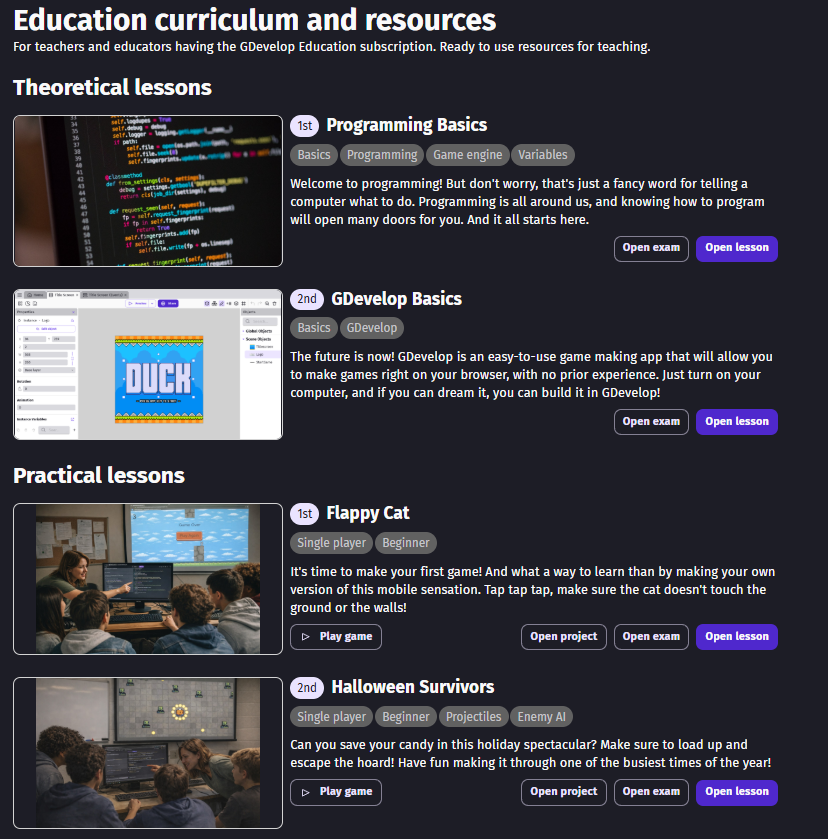
Complete lessions included with the Education subscription.
The curriculum starts with the basics and works through progressively more complex projects. Early builds include games like Flappy Cat, which teaches collision detection and scoring systems, through to a 3D multiplayer snowball fight and a 12-day Game Jam capstone project that mirrors real industry practices.
There's also the GDevelop Master Course: 15 chapters of in-depth, self-paced content spanning hours of instruction. For homeschooling families, self-paced matters. Your child can move fast through concepts they grasp quickly and slow down when something needs more time. No one falls behind. No one sits waiting.
You Can See What Your Child Is Building, From Anywhere
Teacher accounts in GDevelop for Education can access every project made by students and open them in read-only mode. As a homeschool parent, you're the teacher. So you can check in on your child's projects from your own device without sitting next to them, preview the actual game to see if it runs, and track what they've been building over time.
Student accounts also include version history for all cloud projects, so you can see how a project evolved across multiple sessions. That's useful for grading, and also just interesting to watch your child's thinking develop across a project.
It Works on Whatever Device You Have
Nothing to install. GDevelop works on Windows, Mac, Chromebook, iPhone, iPad, and Android devices. It runs in a browser. Your child can work at the kitchen table on a family laptop in the morning and pick up the same project on a tablet in the afternoon. Projects are saved to the cloud and accessible from anywhere.
One thing worth knowing: projects remain yours even after a subscription ends. You can download them locally and keep building with GDevelop's free version. No lock-in.
It Works for a Wide Age Range
GDevelop for Education works with children as young as around 10 years old but stays engaging and challenging through high school and even post-secondary education. Homeschooling families with multiple children at different ages can use the same platform. The younger child builds their first Flappy Cat clone; the older one is designing enemy AI for a platformer.
One Danish teacher reported using it with students ages 9 to 15 in an after-school setting, noting that the youngest kids were navigating GDevelop rapidly due to their familiarity with Scratch. If your child has spent time with Scratch, the jump to GDevelop is natural, but GDevelop goes much further.
You Don't Need a Computer Science Background
Teachers from all backgrounds, including art and music teachers, have successfully implemented the curriculum without any programming experience. The platform is designed to be teacher-friendly first.
The curriculum is clear enough that a parent without coding experience can follow it alongside their child. Many families find this works well: you're learning together, which fits naturally into how a lot of homeschool subjects already run.
It's Used in Real Schools, With State Approval
You won't be alone in using GDevelop to teach game creation. A teacher in Washington State developed a Video Game Design course built around GDevelop and presented it to the state board of education. It was approved for official use and received district funding. That curriculum is publicly available to download.
GDevelop for Education is used by more than 10,000 students across the Americas, Europe, and Asia. These are students in accredited schools, university courses, and bootcamps running structured programs. When you use it at home, you're using the same tool those classrooms use.
What It Actually Teaches
Game development covers more ground than it looks like on the surface. Building a game requires students to think like engineers: planning and managing complex projects while developing technical skills. But it also taps into their artistic side, demanding creativity, empathy, and persistence. Games can also incorporate content from any subject: history, chemistry, economics.
So a child building a historically-themed game is doing research, writing, design, logic, and project management at the same time.
Teachers using GDevelop report 50% higher student engagement compared to traditional programming courses. Those numbers come from classrooms with 20+ students, competing schedules, and short attention spans. At home, with a child working on something they actually chose, that number should only go up.
One Account Is All You Need
The Education plan starts at 5 seats, with each seat covering either a teacher or student account. For a homeschooling family, that means one parent account and room for multiple children, with cloud storage, version history, and the full curriculum included for each.
Start teaching game development, along with XXI century-proof soft skills, with GDevelop for Education.