Why Use GDevelop When You Can Just Use AI?

Marcos Codas
Posted
Type a sentence into an AI chatbot today and you can have a playable game prototype before your coffee gets cold. Tools like Claude, Gemini and ChatGPT can scaffold a working game loop, draw some boxes that move when you press arrow keys, and hand you a file you can run in a browser. So why bother with a dedicated game engine at all?
Because getting an idea onto a screen was never the hard part of making a game. It just feels that way right now, because AI made that one step dramatically easier and put it in the spotlight. The rest of the job, the part where a prototype turns into a game other people actually play, test, and give you feedback on, hasn't gotten any easier by typing prompts into a chat window.
The easy part got easier. The hard part didn't move.
Ask an AI assistant to build you a simple platformer and it will. Ask it to make the touch controls feel right on a phone, keep working after you've spent three hours iterating on it, and still run smoothly when you add forty more objects to the scene, and you'll start hitting the limits fast.
Vibe coding a game from scratch means you're also the one debugging it. When an AI-generated codebase breaks (and it will), you're reading code you didn't write, in a language you may not fully know, trying to figure out which of the last twenty prompts introduced the bug. Long sessions get worse over time too: context windows fill up, the assistant starts forgetting earlier decisions, and you watch it quietly contradict something it built an hour ago. Anyone who's pushed a long AI coding session past a certain point has watched the assistant lose the thread and start guessing.
Mobile controls are a good example of where this gets expensive. Getting a virtual joystick to feel natural, with the right dead zones, the right touch area, the right response curve, is a fiddly problem that takes real iteration to solve well. Burning thousands of tokens asking an AI to tweak a touch control loop, over and over, is not a good use of your time or your API budget. GDevelop ships with that already solved: drag a platformer or top-down behavior onto an object and the controls, collisions, and physics are handled. You're not paying to reinvent something that already works.
Getting your game onto an actual phone
A prototype that only runs in your local dev environment isn't a game yet. It's a demo only you can see. Getting it in front of players means publishing it somewhere they can reach, and that's where AI-only development runs into a wall that has nothing to do with prompting.
Want your AI-built game on iOS? You'll need a Mac, Xcode, an Apple Developer account, code signing certificates, and a working understanding of how Apple's build and submission process behaves on any given week. Android isn't much friendlier: Android Studio, a signing keystore, Gradle configuration, and a Play Console listing before anyone outside your own device can install it. None of that is something an AI chatbot can do for you. It's manual setup, in tools that have nothing to do with game logic, and it eats a weekend the first time you do it.
In GDevelop, exporting is a button. Web, Android, desktop, and iOS builds come from the same project with one click each:
- Web: publish directly to GDevelop's own platform, gd.games, or export an HTML5 build for itch.io, Newgrounds, CrazyGames, or your own site.
- Android: one-click APK build, ready to install or submit to the Play Store.
- iOS: one-click export with automatic upload to the App Store, no Xcode required.
- Desktop: Windows, macOS, and Linux builds from the same project.
You still need an Apple Developer or Google Play account to publish through their stores, that part doesn't go away. But the build process itself, the part that normally eats a day of fighting unfamiliar tooling, is gone.
Multiplayer without a server bill
Multiplayer is one of the clearest places where "I'll just have AI build it" turns into a much bigger project than it looked like at first. A working multiplayer game needs server infrastructure, state synchronization, lag compensation, and a system to handle players dropping in and out mid-session. None of that is a weekend prompt away. Even with an AI assistant generating the networking code, you're still the one paying for servers, monitoring uptime, and fixing it when it breaks under real player load, which is usually the exact moment you can least afford it to.
GDevelop's multiplayer is built in and free to use. Lobbies support up to eight players, handle authentication through gd.games accounts, and use client-side prediction so movement still feels responsive over a real connection. There's no server to configure and no infrastructure bill creeping up as your player count grows. If you've tried to get something similar working by hand, you know how much of "later" gets eaten by maintaining it.
You don't have to start from a blank canvas
A lot of what makes a game feel finished, menus, score systems, basic enemy patterns, isn't creative work so much as it's setup work that every game needs. GDevelop's template and custom objects library gives you a working starting point: platformer, top-down RPG, shoot-em-up, and dozens of other genres come with controls, behaviors, and structure already in place.
The same goes for art. GDevelop's built-in Asset Store has hundreds of thousands of free and paid asset packs, characters, environments, UI elements, sound effects, cleared for commercial use and ready to drop straight into a scene. No prompting an image generator five times hoping for a usable sprite, no sorting through licensing terms on a stock site to find out if you're actually allowed to sell a game with that asset in it.

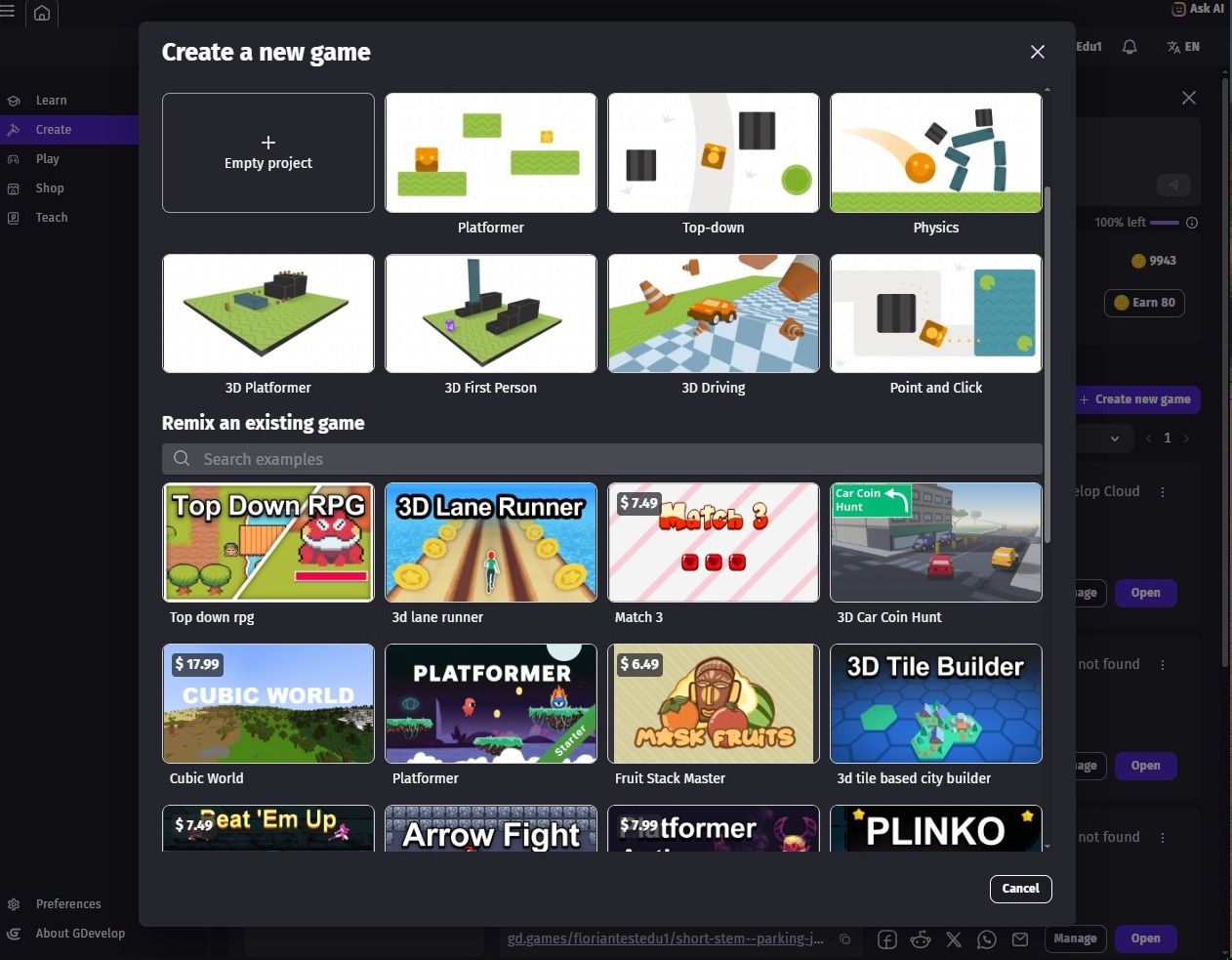
With GDevelop, you can start from scratch, or modify existing templates.
Runs in a browser
GDevelop runs entirely in the browser, so you don't need a powerful machine to build a game. A Chromebook is enough to make a full game and export it to a phone. That matters for students, for anyone without access to a high-end laptop, and frankly for anyone who'd rather not dedicate a desktop to a game engine install.
You can still talk to an AI. Just one that knows your project
None of this means giving up on AI assistance. GDevelop has its own AI Agent built into the editor. Describe what you want in plain language, "make an enemy that patrols between two points and chases the player when they get close," and the Agent builds it directly inside your project: creates the object, adds the behavior, writes the event logic, and places it in the scene. You watch it happen in real time, and every event it creates is visible and editable afterward.
The part that actually matters: getting your game played
There is a real gap between "I made something playable" and "I made a game." GDevelop's game jams regularly draws thousands of participants, and over 2,700 games have been created for them. Every game gets played and rated by other developers, which means you walk away with actual feedback instead of just a finished build sitting on your hard drive.
A chatbot can help you build something. It can't put your game in front of thousands of other developers, give you a community to debug with on Discord, or hand you a spot in an end-of-jam showcase video when your game does well. Making a game playable and making a game played are two different problems.
Also, thanks to sponsors like CrazyGames, your game even gets published on a major web games platform.
Idea to playable was never the bottleneck
AI made the first step of game development faster than it's ever been, and that's useful. But a working prototype isn't a finished game, and a finished game sitting in a folder isn't a game anyone's played. GDevelop covers the part AI alone leaves you to handle yourself: one-click publishing across platforms, free no-code multiplayer, ready-made templates and assets, an editor you can actually debug because you can see what's happening inside it, and a community built around getting your game in front of players. The Agent is in there too, if you want AI doing the typing. You just don't have to build the rest of the ecosystem yourself to use it.